Raw capture — raw/agent-standup-github.md
url: https://github.com/Atoll92/agent-standup date_fetched: 2026-10-11
See who is waiting on whom, and who is blocked — across all your Claude Code sessions — at zero token cost. Agent Standup turns the session files Claude Code already writes into a live team call (and a board of every session): it only reads local files and never calls Claude unless you turn on French translation or the jokes.
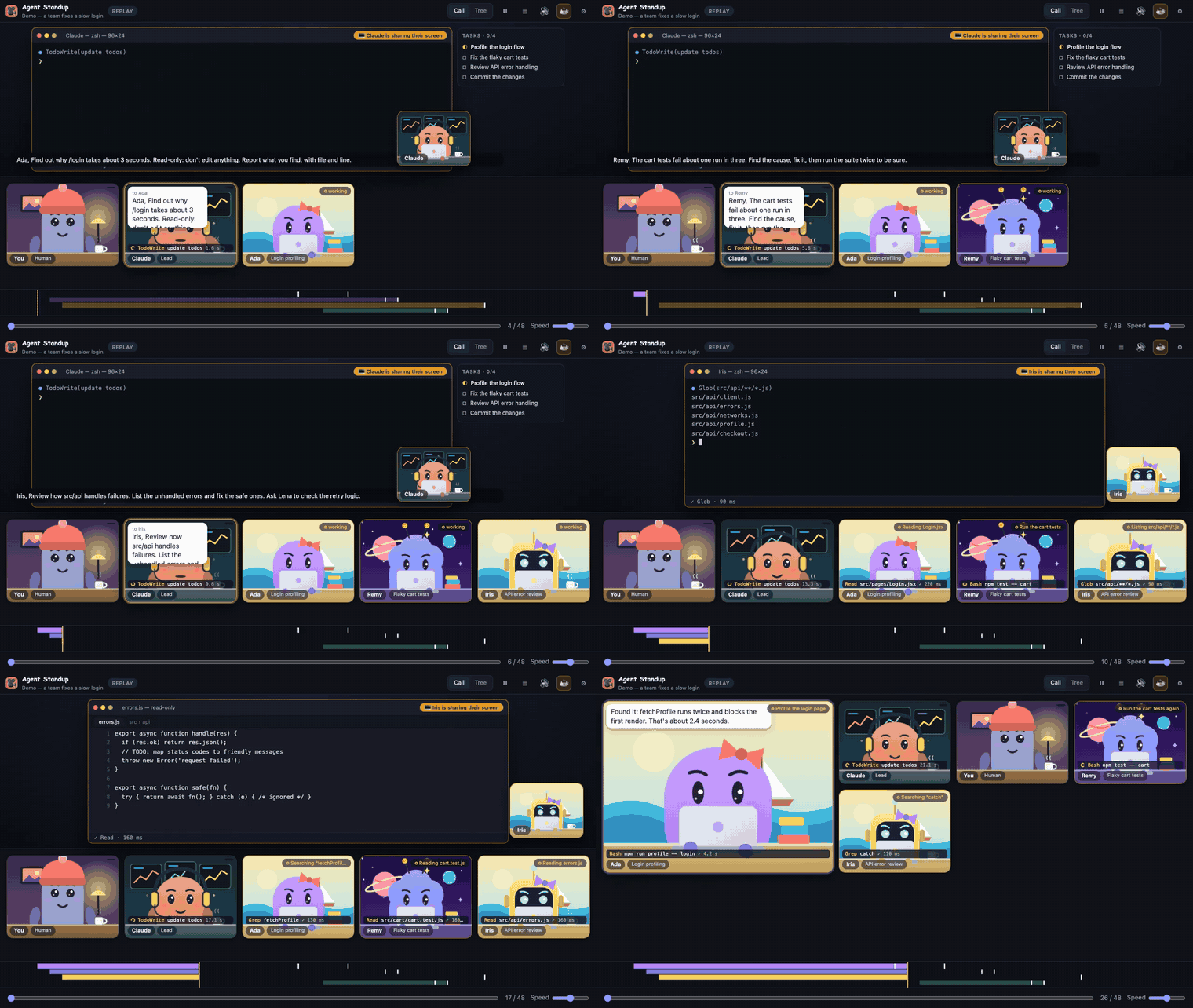
Your Claude Code session as a live team call. The lead gives orders, sub-agents join the call, work at their desks, share their screen and report back — with voices, expressions and a view of the real work as it happens.
Runs as a VS Code extension, a terminal command, or a desktop app. Try it in 30 seconds, no install and no editor (Node 18+): npx @double_geste/agent-standup --open, then ⚙ → Source → Demo.
→ Website & download: https://atoll92.github.io/agent-standup/
A fictional team fixing a slow login page — the built-in demo (⚙ → Source → Demo). Watch the full 1-minute video.
Unofficial community project, not affiliated with or endorsed by Anthropic. "Claude" is a trademark of Anthropic.
.webm when it cannot. X, phones and most chat apps refuse .webm.agent-standup-clip.mp4 (.webm when the browser cannot record MP4). In the middle of a replay it starts at the current position; otherwise one spoken line before the first error or loop of the session, and failing that at the moment the lead first hands out work. The line being said when time is up is finished rather than cut, so the length varies by a few seconds. The clip carries the site address (atoll92.github.io/agent-standup) in the top right corner and ends with a short end card; the full export has neither.Bash or Read, stays); the session title is replaced by "Agent Standup"; pictures (screenshots, images) become an empty frame. What the agents say is not masked: speech bubbles, subtitles and voices are kept as they are, so check the clip before posting if agents quote code or names aloud.On its tile
- Activity tag (top right) — what the agent is doing right now: Reading App.jsx, Editing foo.ts, Writing …, Running npm test (or the command's own description), Searching “pattern”, Listing **/*.js, Fetching host, Updating todo list; then ✓ done when it reports.
- Ticker (bottom) — the current tool call and target, with a spinner and a running counter while it executes, then ✓ / ✗ and its real duration.
- Status border: orange while working, spotlight while speaking, the tile fades and dissolves 2 minutes after its report.
On the shared screen (appears when an agent uses a tool, stays while a command is still running, then ~4 s after the last action)
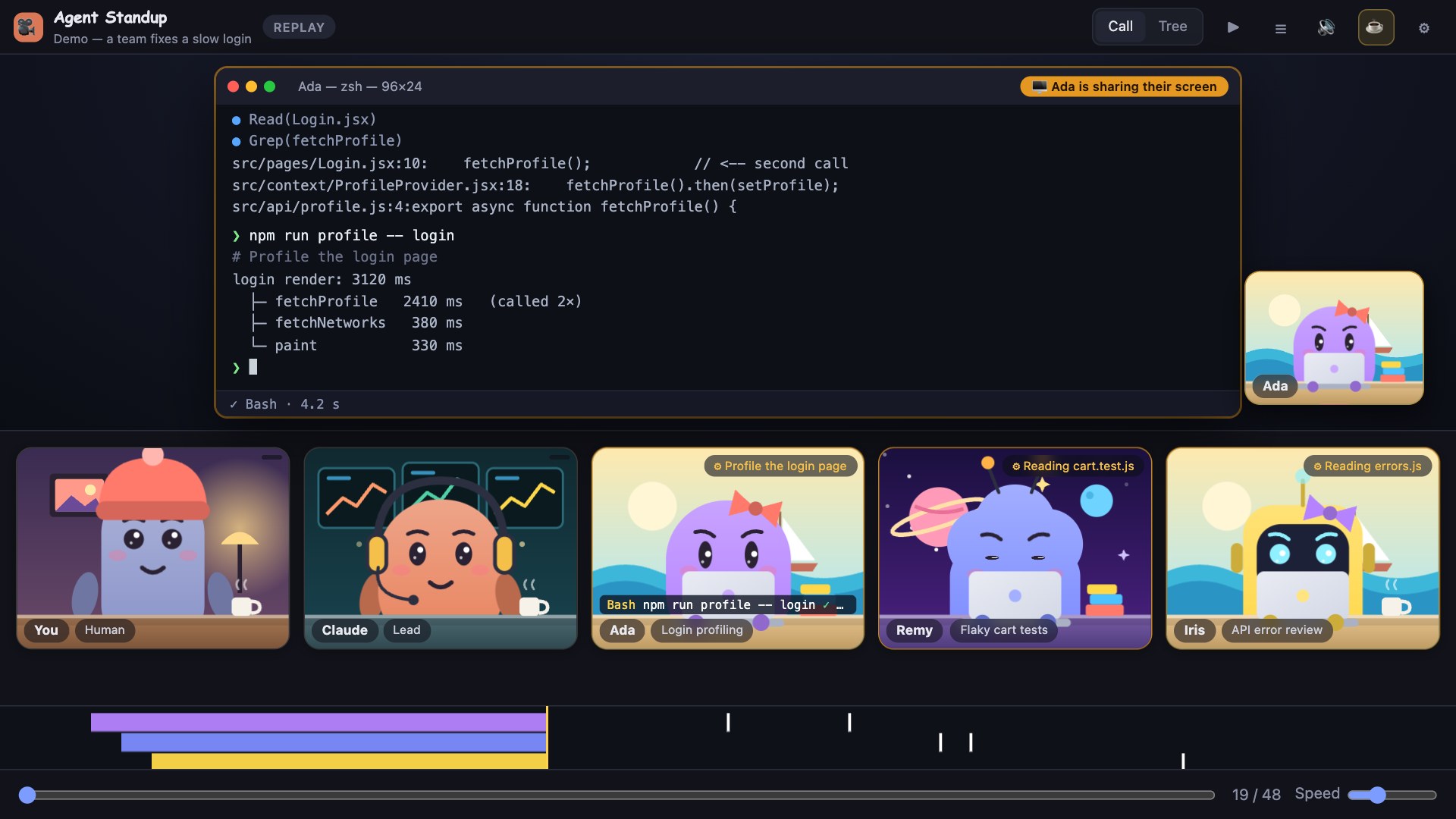
- Terminal — ❯ command (with its description), then its real output (first lines, errors in red, “… +N lines”), ● Grep(…) / ● Glob(…) with matches, a spinner for what is still running. Footer: ✓ Bash · 1.2 s or ⠋ Bash · running 3.4 s.
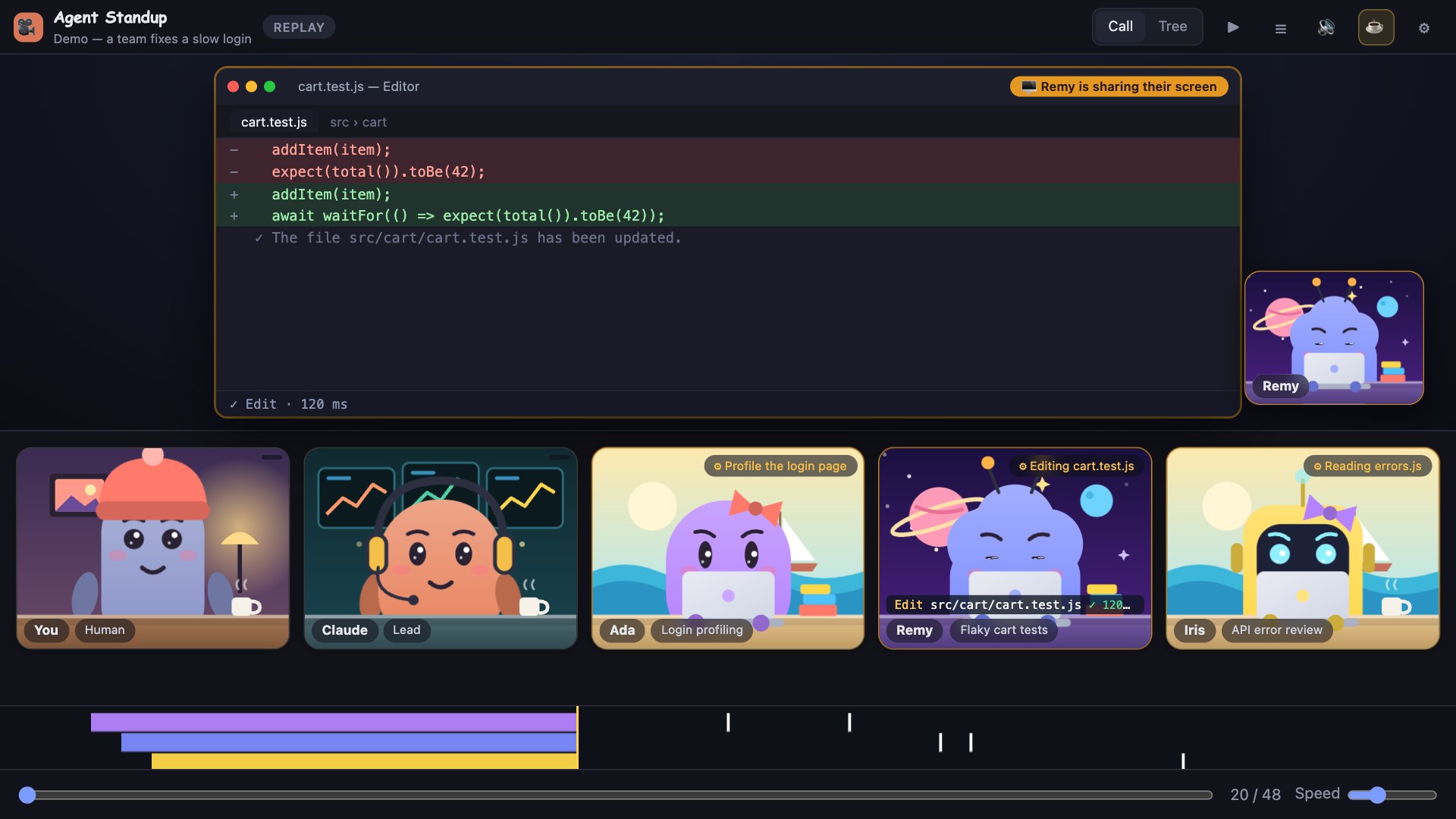
- Editor — for Read: the file with its real content and line numbers (read-only); for Edit: the removed/added lines; for Write: the new content, with the tool's result line.
- Pictures — when a tool gives the agent a picture (a screenshot it takes, an image file it reads: PNG, JPEG, GIF, WebP), the picture is shown on the shared screen, in a taller window, and stays up for several seconds (8 in a live call) whatever the agent does next. It is also in the agent's Recent activity and in exported videos. Pictures are read from the session file itself, never from your disk.
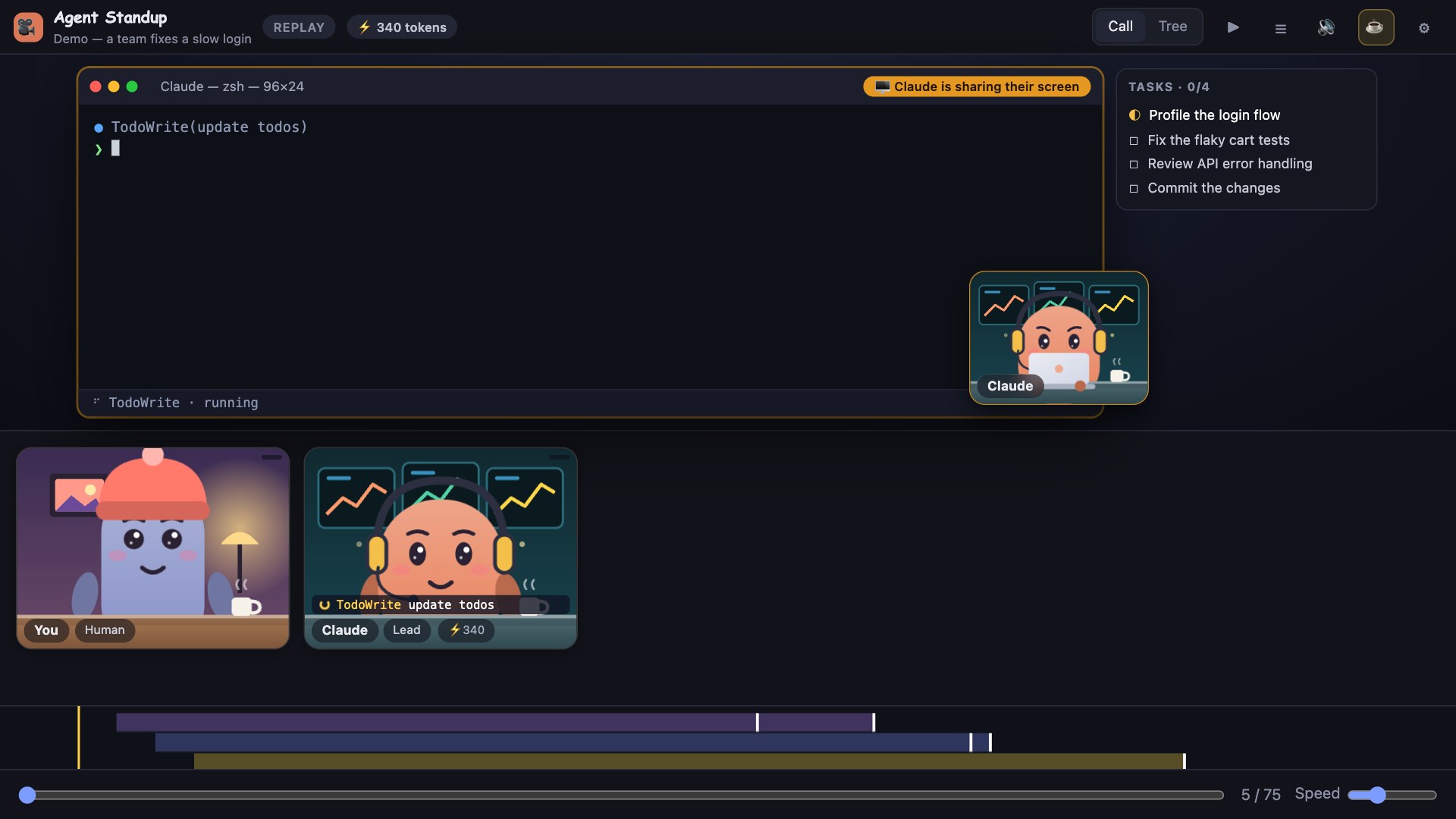
- Task list — if the agent keeps a todo list, a side panel shows it live (☐ pending, ◐ in progress, ☑ done).
- The presenter's camera lip-syncs when they speak; the subtitle bar shows what they say.
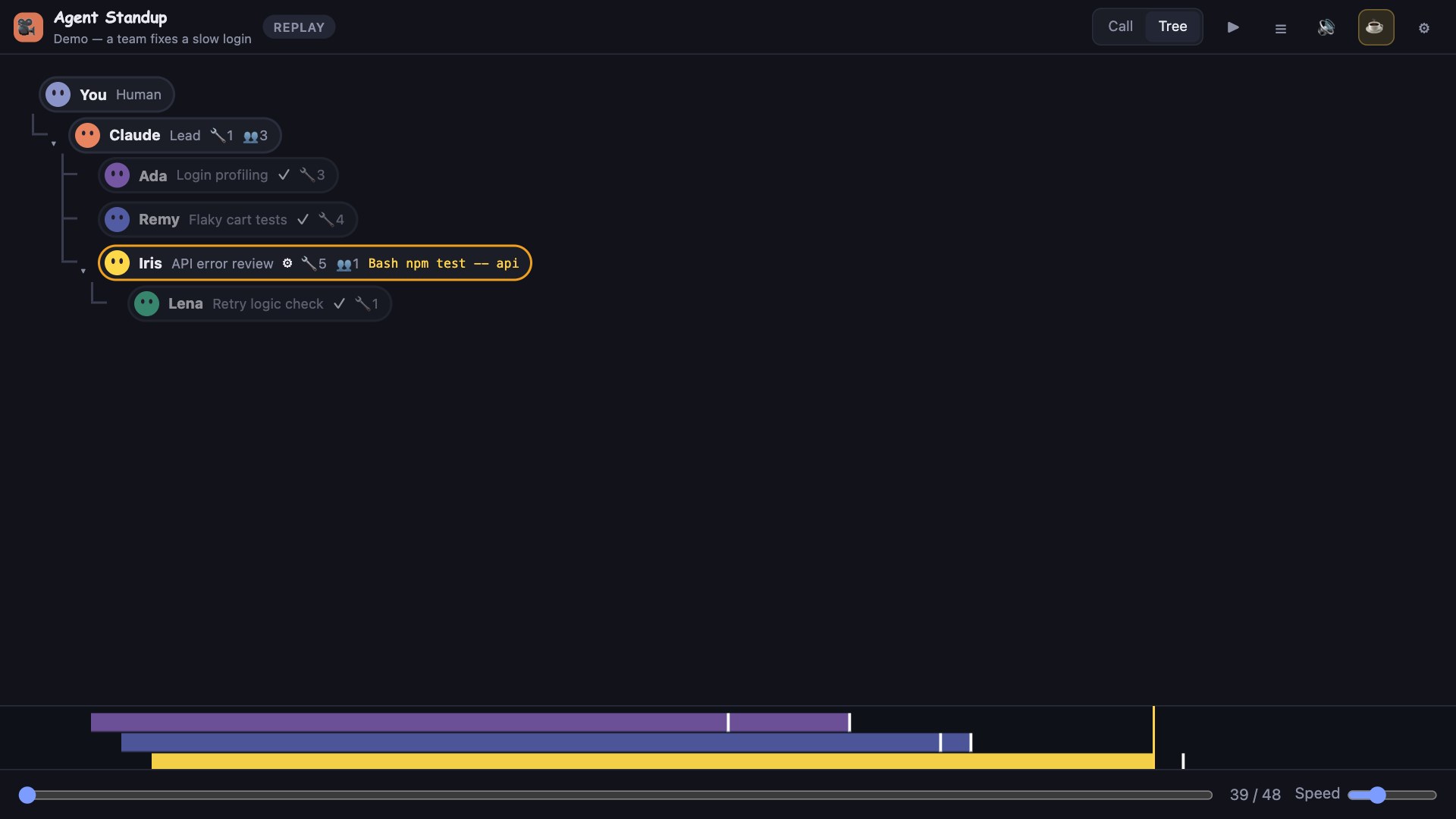
Click an agent — its prompt, tool counts and a Recent activity list (last 30 calls with status, duration, and expandable command + output).
Outputs are trimmed (about 1–2 KB each) to keep the call fast. Results of internal calls (sub-agent launches, messages) are not shown.
| Real commands, real output | The exact change | Who asked whom |
|---|---|---|
 |
 |
 |
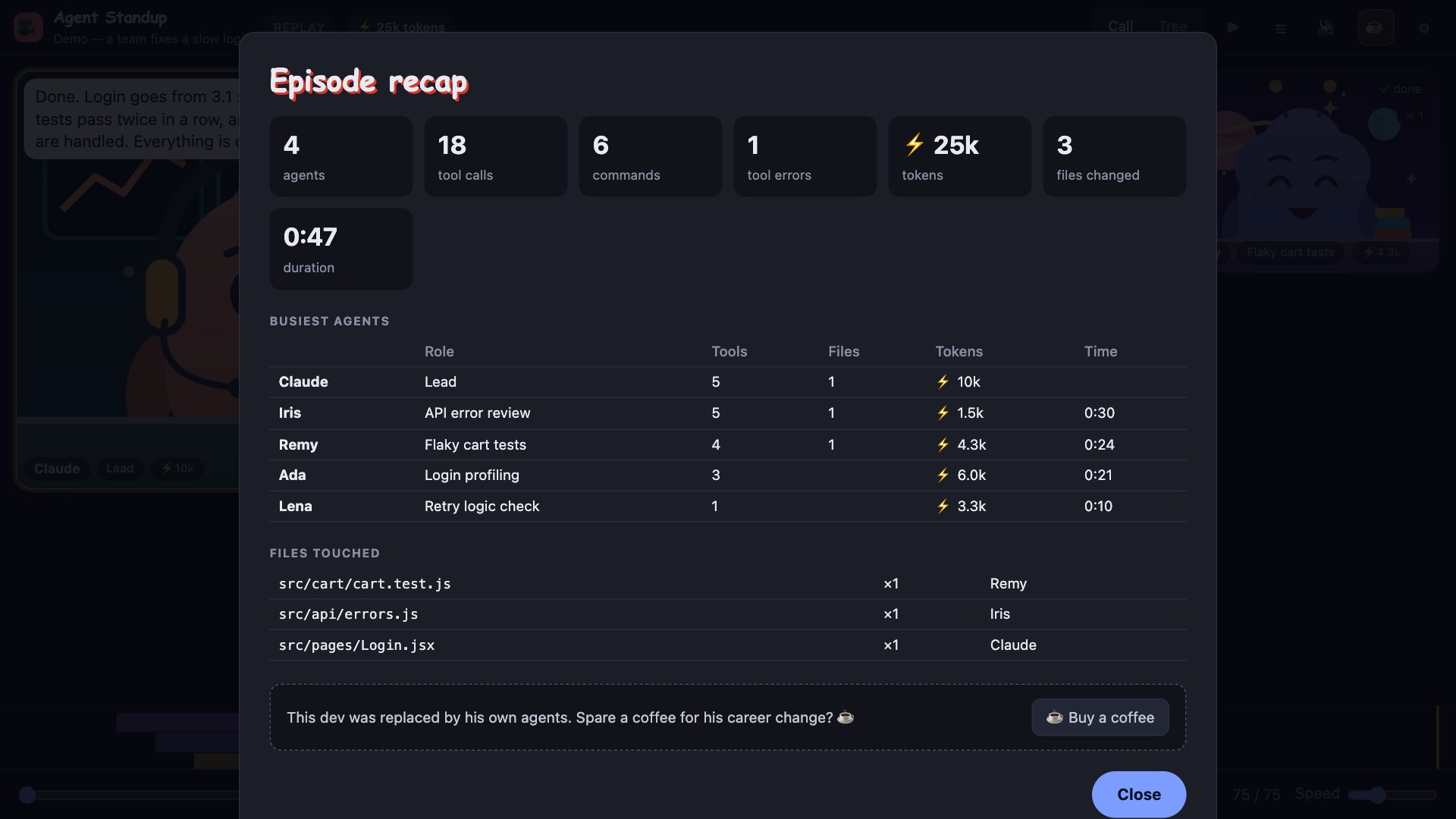
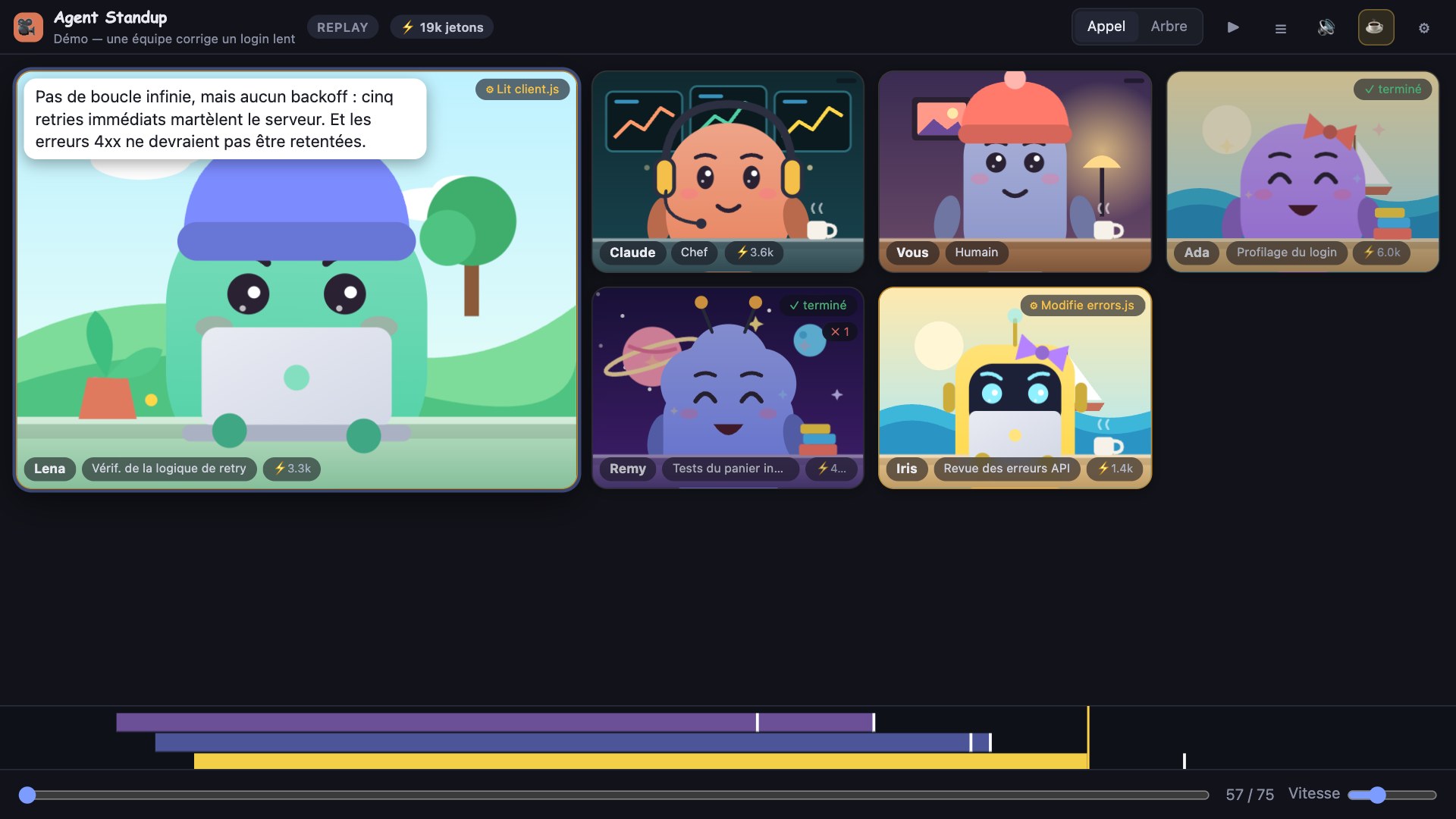
| Task list of an agent | End-of-episode recap | In French |
|---|---|---|
 |
 |
 |
Sub-agents answer when they get an order ("Running the tests, as usual.", "Grepping like there's no tomorrow."), say goodbye when they leave, and now and then have a little thought; a failing tool call makes the tile shake; confetti when the lead finishes a long job. Whoever receives a report sometimes says thanks ("Got it, thanks."), and an agent that has been thinking for a long time says so ("Hmm, let me think."). When the call has been silent for a while, someone fills the gap the way people do in video calls ("Can you hear me?", "You guys still here?", "Can everyone see my screen?"): after 45 seconds in a live call, about 10 seconds in a replay, at most three times per silence and further and further apart. It is all local (no API), absent from the transcript, and can be turned off in ⚙ → Little lines & animations.
The status bar shows live counts for your workspace (needs you, working, your turn) and turns red when an agent may be waiting for you; hover for the sessions, click to open the call on the most urgent one (agentStandup.statusBar).
The header shows how full the lead's context is (ctx 62%, orange then red, with a warning before auto-compaction); tiles and list rows show it from 50%. In Replay, the Highlights bar jumps to the first error, the longest wait, compactions and possible loops. A 🔁 badge marks an agent repeating the exact same call or failing repeatedly. The context window (200k or 1M) is inferred, because transcripts do not state it.
| Where | How |
|---|---|
| VS Code | Install Agent Standup from the Extensions view (Marketplace). |
| Cursor, Windsurf, VSCodium… | Download agent-standup-<version>.vsix from the latest release and use Extensions → … → Install from VSIX. |
| Any terminal, no editor | npx @double_geste/agent-standup --open (Node 18+; the package is on npm). Offline alternative: npx https://github.com/Atoll92/agent-standup/releases/latest/download/agent-standup-cli.tgz --open. |
| A small desktop app (macOS) | Download Agent-Standup-<version>-mac-apple-silicon.zip (or -mac-intel.zip) from the release, unzip, move Agent Standup to Applications. The app is not signed with an Apple developer ID, so the first time: right-click the app → Open → Open (or run xattr -dr com.apple.quarantine "/Applications/Agent Standup.app"). It has a window and an indicator in the menu bar, and notifies you when an agent may need you. Windows and Linux builds (-windows-x64.zip, -linux-x64.zip) are on the same release page but experimental and not tested by hand. |
| Claude Code status line | npm i -g @double_geste/agent-standup, then in ~/.claude/settings.json: { "statusLine": { "type": "command", "command": "agent-standup statusline" } } → shows ⚙2 ✋1 under your prompt. |
| tmux (not tested here) | set -g status-right '#(agent-standup status --here)' |
| Neovim (not tested here) | call vim.fn.system('agent-standup status --here') from a timer and show the result in your statusline plugin; agent-standup status --json gives machine-readable output. |
| JetBrains IDEs (not native yet) | Settings → Tools → External Tools → +: program npx, arguments -y @double_geste/agent-standup --open, working directory $ProjectFileDir$. |
Other agent tools than Claude Code (Codex CLI, Gemini CLI, OpenCode…) are researched in ROADMAP.md: their log formats are mostly undocumented, so no adapter is shipped yet.
Pick one in ⚙ → Language: English, Français, 繁體中文, 简体中文, Español, Deutsch, Português (Brasil), 日本語. The interface (menus, chips, tooltips, recap) is translated; VS Code's command titles, setting descriptions and status bar follow VS Code's own display language. English and French are written by hand; the other languages are AI-drafted and not yet reviewed by native speakers, so corrections are very welcome: each language is one small JSON file (public/locales/<code>.json), see public/locales/README.md to fix or add one (npm run i18n checks the files). The words the agents say stay in the language of your session (French translation of their lines is optional); the little banter lines and the demo exist in English and French.
Replace the drawn characters with your own pixel art. Drop PNG (or GIF/WebP) files, 300 KB at most each, into ~/.agent-standup/characters (⚙ → Characters shows the folder, and in VS Code Open folder opens it; the agentStandup.charactersPath setting changes it):
- lead.png (or claude.png) is the lead, you.png is you, any other image becomes a sub-agent (one per agent, repeated if you have fewer images than agents);
- name-talk.png next to name.png is an optional open-mouth frame that shows while the character speaks;
- 32×32 or 64×64 px, transparent background, facing front, feet at the bottom looks best. The art is shown crisp (no smoothing) on top of the usual scene and desk, and every status, hand and badge still works.
Press Reload in the menu to see changes. A starter pack is in examples/characters.
On wide windows (900 px+), a fixed list sits left of the call: every agent with its role and one status line, most urgent first (needs you, stalled, working, waiting, done) and the lead pinned on top. It stays readable with dozens of agents, which a grid of tiles does not. Click a name to put that agent in the spotlight (kept for 25 s even when someone else speaks), double-click for details. Toggle it in ⚙ → Agents list.
The Sessions tab lists every session active in the last 12 hours, across all projects, with one state each: working, needs you?, waiting on sub-agents, your turn, or idle (and how many sub-agents are active). It refreshes every few seconds and reads only the end of each transcript, so thirty parallel sessions stay cheap. Click a card to follow that session in the call.
Every tile carries one status: working (with what it is doing), waiting on another agent (who), needs you? (a file edit or write, or a question, has been pending for 15 s+), stalled (waiting on an agent that has been silent for 2 min+), or done. A summary sits in the header, and the tab title shows how many agents need you. The "needs you?" signal is a heuristic: Claude Code does not record permission prompts, so commands (Bash) are not flagged because they can legitimately run for minutes (they get a ⏳ badge after 1 min instead). Measured on real sessions, edits that stay pending for 15 s+ are rare, so the signal is mostly right.
Four styles in ⚙ (default: Cartoon voices, so everything stays understandable): - Animal Crossing — every agent "talks" in gibberish, one blip per letter, with a sentence melody (up for questions, down for statements) and a register of its own. - Simlish — the same idea with flowing syllables, vowels and little consonant noises. - Cartoon voices — the real words read by your system voice, with a character per agent (chipmunk, deep, robot, wobbly, radio, monster, squeaky). - Natural voices — plain system voices. - Very natural voices — Kokoro-82M, a small open speech model that runs on your machine. Optional: pick it in ⚙ and click Install (about 730 MB, one folder in your user cache, installed with npm; the model is fetched on first use). Until it is ready the system voices keep talking. Mostly English voices, one French voice.
Long lines are subtitled one sentence at a time, in step with the voice.
Three ways in — pick one (details in Works with your tools): the VS Code extension (below), the agent-standup command (npx @double_geste/agent-standup --open), or the desktop app (macOS, from the release page). Cursor, Windsurf and VSCodium install the same .vsix.
In VS Code: Extensions view → search Agent Standup → Install. Or: https://marketplace.visualstudio.com/items?itemName=DoubleGeste.agent-standup
agent-standup-<version>.vsix (don't send it by email: Gmail and others block .vsix files).… menu (top right) → Install from VSIX… → pick the file.
Or from a terminal: code --install-extension agent-standup-<version>.vsix (macOS: run Shell Command: Install 'code' command in PATH first if code isn't found).Direct download of the latest version: https://github.com/Atoll92/agent-standup/releases/latest/download/agent-standup.vsix
Or with the GitHub CLI: gh release download --repo Atoll92/agent-standup --pattern "*.vsix", then the code --install-extension line above.
git clone https://github.com/Atoll92/agent-standup.git
cd agent-standup
npm run package                       # needs Node 18+; produces agent-standup-<version>.vsix
code --install-extension agent-standup-*.vsix
To hack on it instead: open the folder in VS Code and press F5 (launches an Extension Development Host).
After cloning the repository (Option B): node server.js and open http://localhost:4747 (see Standalone below). Without cloning: npx @double_geste/agent-standup --open.
The first click on Join is required by browsers to allow sound.
| Command | What it does |
|---|---|
| Agent Standup: Open live call | Opens the call in a panel beside the editor |
| Agent Standup: Show sidebar | Opens the call in the Activity Bar view |
| Agent Standup: Open characters folder (your own pixel art) | Creates and opens the folder for your own characters |
| Agent Standup: Open in browser (voice + sound) | Opens the same call in your default browser |
| Setting | Default | |
|---|---|---|
agentStandup.port |
0 |
Local port of the server. 0 = a free port is picked automatically for each VS Code window (recommended) |
agentStandup.statusBar |
true |
Live counts in the VS Code status bar (needs you / working / your turn) for this workspace |
agentStandup.shareUsage |
false |
Opt-in, anonymous: at most one empty request per day to a 1-pixel file on GitHub, to count active installs (ignored when VS Code telemetry is off) |
agentStandup.charactersPath |
(empty) | Folder with your own character images (default ~/.agent-standup/characters) |
agentStandup.claudePath |
(auto) | Full path to the Claude Code executable if it isn't found automatically (needed only for French translation) |
agentStandup.autoOpen |
false |
Open the call when VS Code starts |
agentStandup.onlyThisWorkspace |
true |
Follow only sessions started in the open folder (falls back to the newest session if there is none) |
| Call · Tree · Sessions (Appel · Arbre · Sessions in French) | tiles, hierarchy, or one card per recent session |
| ⏸ / ▶ (Space) | pause / resume |
| ☰ | transcript |
| 🔊 / 🔇 (M) | mute everything |
| ⚙ | language · voices · ambience · office music (station + volume) · agents list · little lines & animations · reactions bar · remove finished agents · Live / Replay / Demo (and project / session picker) · recap · export video · clip to share (25 s) · hide code & file names in videos |
| T · R · L | tree/call · recap · transcript |
| Esc | close recap / menu |
In Replay, a slider and a speed control appear at the bottom, and clicking a transcript line jumps there.
Turn on Office music in ⚙ and pick a station (FIP, Groove, Jazz, Electro, Reggae, Rock, Nouveautés, Pop) and a volume. The stream is played live from Radio France's public Icecast servers directly in the page; it starts when you press Join (browsers require a click). When any agent speaks, the music drops to ~15 % within a fraction of a second and returns slowly after the last line. Muting (🔊 / M) stops the stream. Music is for your ears only: it is never included in video exports. Stations are for personal listening; nothing is stored or redistributed.
If several Agent Standup windows are open on the same machine (sidebar, editor panel, browser tab), only the last one where you pressed Join / Play / 🔊 plays sound; the others stay silent and show 🔈 (click it to take the sound back). This avoids hearing the same call twice, possibly in two languages. A window that stops answering releases the sound after a few seconds.
Voices are generated on your machine and played identically in the editor and in the browser:
| OS | Engine | Notes |
|---|---|---|
| macOS | say |
For nicer voices: System Settings → Accessibility → Spoken Content → System Voice → Manage Voices → download a Premium / Enhanced voice |
| Windows | installed system voices (SAPI, via PowerShell) | For French: Settings → Time & language → Speech (or Language) → add French |
| Linux | espeak-ng |
Must be installed |
If no voice is available the agents "mumble" instead. Each agent gets a stable voice from the best ones installed.
Agent messages are in the language of the session. With French selected, each line is translated as it arrives using your local claude CLI (claude -p, Haiku) through two warm background workers: about 3–4 s per line once warm (the very first line takes ~10 s), then spoken. If a translation is not ready in time (7 s live), that line is read in the original language. The menu shows a hint if translation or the French voice is unavailable.
Optional speed-up: set ANTHROPIC_API_KEY in the environment of VS Code / the server and translation calls the Anthropic API directly (~1–2 s).
Privacy & security: everything runs locally. The server listens on 127.0.0.1 only and rejects requests that do not come from localhost (other websites and DNS-rebinding attempts get a 403), so no web page can read your sessions. Translation and jokes send the shortened agent lines to Claude through your own Claude Code login (or your API key if you set one). With English selected and music off, nothing leaves your machine. (Office music connects your browser to icecast.radiofrance.fr while it is on.)
node server.js # http://localhost:4747 (PORT=… to change)
http://localhost:4747/ → live, newest sessionhttp://localhost:4747/?live=0 → replay picker?proj=<project-dir> → limit live to one project folder under ~/.claude/projectsRequires Node 18+.
Claude Code writes every session to ~/.claude/projects/<project>/<session>.jsonl, and each sub-agent to <session>/subagents/agent-*.jsonl (with a .meta.json linking it to the tool call that created it). Agent Standup merges these into one timeline: orders (the prompt a lead sends to a sub-agent), spoken text, tool calls (with their inputs), the results of those calls (matched by tool-call id, with real durations) and final reports. Each file is parsed once and then only the new lines are read, so even a very large session refreshes in a few milliseconds; responses are compressed. The page polls the server every 0.7 s and plays new events.
The website counts visits anonymously (a 1-pixel file hosted on GitHub per channel: no cookies, no third-party tracker); the app itself has no telemetry.
onlyThisWorkspace the call follows that folder.agentStandup.port it may be taken (use 0).PATH, the usual install folders (Homebrew, npm, nvm, ~/.local/bin, Windows %APPDATA%\npm) and the copy bundled with the official VS Code Claude Code extension. If none is found the app quietly stays in English; set agentStandup.claudePath, or run claude once in a terminal to sign in. If VS Code itself was started from inside a Claude Code session, restart it normally.node server.js..webm.Several ideas in 1.23 (settings kept in a file, session stickiness, subtitles that follow the voice, Kokoro voices) started in neondragon's fork of this project. Thank you! Their code was read and rewritten for this codebase. The Traditional Chinese wording was polished with suggestions from a Taiwanese reader on Reddit. Unofficial: not affiliated with Anthropic.
MIT
This dev was replaced by his own agents. If Agent Standup made your sessions more fun, you can buy him a coffee ☕ — there is also a ☕ line in the ⚙ menu and at the end of each recap.
Agent Standup is free and MIT licensed. I'm also available for work around AI agents and developer tooling: reach me through my GitHub profile, Atoll92.
Agent Standup reads local session files and sends nothing anywhere by default. The only optional network uses are: French translation / jokes (your own Claude login, off unless you turn them on), the FIP radio stream (if you turn it on), and the optional usage counter: if you set agentStandup.shareUsage to true (off by default, and ignored when VS Code telemetry is off), the extension makes at most one empty request per day to a 1-pixel file in this repository's releases. There is no identifier and no content; GitHub sees your IP like for any download. It lets the maintainer count active installs (npm run stats).
%20dev%20a%20coffee-ffdd00?logo=buymeacoffee&logoColor=black)